I was in the process of writing the next blog post on my initial experiments testing libraries for programming language detection, when I noticed a minor detail on environment setup. Inspired, I’m writing this post to share some details on how to “control” the hardware environment to create an experiment that is as replicable and consistent as possible.
Initially requesting hardware resources
When beginning the experiment, I went by several criteria (which I will share in more detail in a subsequent post) to select the machine(s) which I was to use on Grid5000, an HPC commonly used by computer science researchers in France. Rather than select a particular machine, I selected based on my criteria and provided a request for a particular configuration of resources:
For example
- more than
200 Gbmemory - 2 x
A40GPUs available.
In my case, I was looking for
- 4 x
Nvidia Tesla V100(32 GiB)
to satisfy my speed needs when running machine learning.
After briefly checking the machines available to me, I saw that there were a handful fitting my criteria; these are the ones which I was assigned to work with every times.
This information is available on Grid5000 hardware descriptions [1].
| Cluster | Access Condition | Date of arrival | Manufacturing date | Nodes | CPU | CPU Name | CPU Cores | CPU Architecture | Memory | Storage | Network | Accelerators |
|---|---|---|---|---|---|---|---|---|---|---|---|---|
| abacus9 | abaca queue | 2023-11-06 | 2018-12-12 | 1 | 2 | Intel Xeon Silver 4114 | 10 cores/CPU | x86_64 | 192 GiB | 239 GB HDD | 10 Gbps | 4 x Nvidia Tesla V100 (32 GiB) |
| abacus14 | abaca queue | 2023-11-08 | 2019-09-26 | 1 | 2 | Intel Xeon Silver 4214 | 12 cores/CPU | x86_64 | 384 GiB | 240 GB SSD + 240 GB SSD | 10 Gbps | 4 x Nvidia Tesla V100 (32 GiB) |
| abacus16 | abaca queue | 2023-10-16 | 2019-09-26 | 1 | 2 | Intel Xeon Silver 4214 | 12 cores/CPU | x86_64 | 384 GiB | 239 GB HDD | 10 Gbps | 4 x Nvidia Tesla V100 (32 GiB) |
| abacus28 | abaca queue | 2025-02-05 | 2020-12-05 | 1 | 2 | Intel Xeon Silver 4216 | 16 cores/CPU | x86_64 | 384 GiB | 480 GB SSD | 10 Gbps | 4 x Nvidia Tesla V100 (32 GiB) |
Hence, knowing that I’d specified a particular number of GPUs, I was at peace that my experiment was consistent across several machines with the same apparent configuration, particularly since reserving a similar machine in reasonable time on Grid5000 is a persistant challenge (another item that I’ll mention in a subsequent post).
Discovering that not all hardware configurations are the same
Even from the table above extracted from the Grid5000 resource descriptions, it’s notable that the CPU cores and memory are not exactly the same on each machine. I didn’t observe this at the time, especially provided that the GPUs were the most important and the differences seemingly minute.
I’d run my experiments with reliable confidence, marking my main independent variable, the GPU, as “Nvidia Tesla V100.”
What I noticed later on when browsing another resource explorer, was that these “Nvidia Tesla V100” GPUs came in multiple types as well! Now, rereading each machines’ configuration again, it’s apparent that the GPUs, as well as other configurations vary just slightly [1].
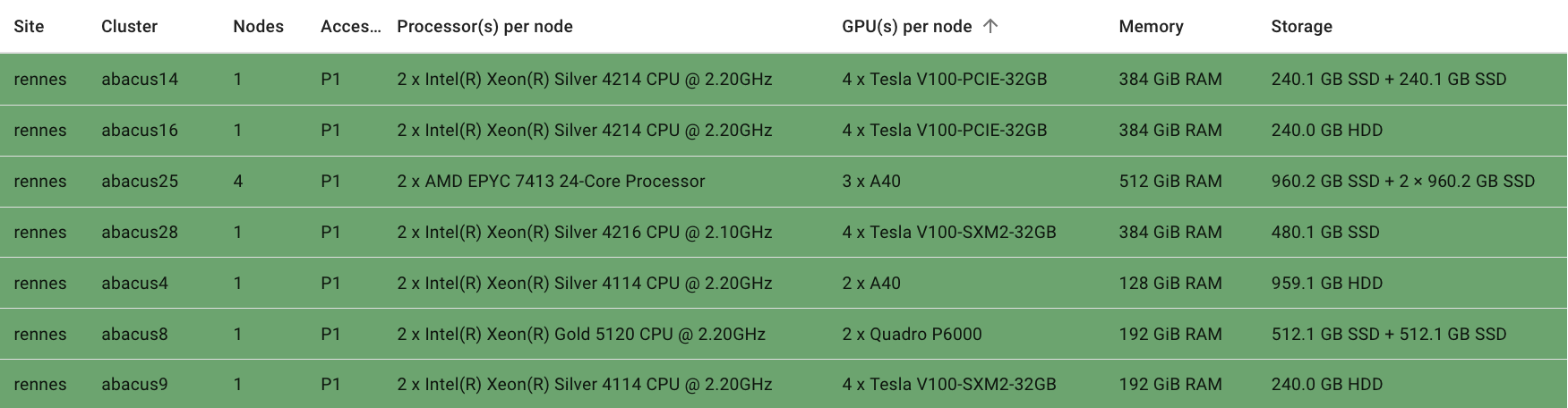
Hence, I truly had run on
Tesla V100-PCIE-32GBandTesla V100-SXM2-32GB
GPUs.
Each “machine” is unique
To further reinforce this, the abacus14 and the abacus16 are both
4 x Tesla V100-PCIE-32GBwithIntel Xeon Silver 4214CPUs,
seeming to be quite similar. But, let’s be careful.
Here are their configurations from Grid5000’s information [1]:
abacus14
1 node, 2 cpus, 24 cores
| Configuration | value |
|---|---|
| Access condition: | abaca queues |
| Model: | Dell PowerEdge C4140 |
| Manufacturing date: | 2019-09-26 |
| Date of arrival: | 2023-11-08 |
| CPU: | Intel Xeon Silver 4214 (Cascade Lake-SP), x86_64, 2.20GHz, 2 CPUs/node, 12 cores/CPU |
| Memory: | 384 GiB |
| Storage: | - disk0, 240 GB SSD SATA Micron MTFDDAV240TCB (dev: /dev/disk0) (primary disk) - disk1, 240 GB SSD SATA Micron MTFDDAV240TCB (dev: /dev/disk1) |
| Network: | - eth0/eno1, Ethernet, configured rate: 10 Gbps, model: Intel Ethernet Controller X710 for 10GbE SFP+, driver: i40e - eth1/eno2, Ethernet, model: Intel Ethernet Controller X710 for 10GbE SFP+, driver: i40e - unavailable for experiment |
| GPU: | 4 x Nvidia Tesla V100-PCIE-32GB (32 GiB) Compute capability: 7.0 |
abacus16
1 node, 2 cpus, 24 cores
| Configuration | value |
|---|---|
| Access condition: | abaca queues |
| Model: | Dell PowerEdge C4140 |
| Manufacturing date: | 2019-09-26 |
| Date of arrival: | 2023-10-16 |
| CPU: | Intel Xeon Silver 4214 (Cascade Lake-SP), x86_64, 2.20GHz, 2 CPUs/node, 12 cores/CPU |
| Memory: | 384 GiB |
| Storage: | disk0, 239 GB HDD RAID Dell DELLBOSS VD (dev: /dev/disk0) (primary disk) |
| Network: | - eth0/eno1, Ethernet, configured rate: 10 Gbps, model: Intel Ethernet Controller X710 for 10GbE SFP+, driver: i40e - eth1/eno2, Ethernet, model: Intel Ethernet Controller X710 for 10GbE SFP+, driver: i40e - unavailable for experiment |
| GPU: | 4 x Nvidia Tesla V100-PCIE-32GB (32 GiB) Compute capability: 7.0 |
Despite our effort, their storage configurations are different. In this case, this may be a potentially minor detail, but it illustrates the importance of a “similar” configuration/machine almost never being equivalent. This is morevover important when working with microcontrollers, as most engineers who do so will assure.
In my situation, the machine’s storage may not be detrimental to the experiment’s control quality. In the reverse direction, I may not be aware of its impact/role at this time, just as I wasn’t aware that the CPUs of the several machines I’d worked with were different.
Conclusions and best practices
The principle of applying an “appropriate level of specificity” is important in research and elsewhere. But, in this case, the experiments’ independent variables are ensured consistent by either looking in greater detail at each machines full configuration or requesting the exact same machine again.
Principles for ensuring HW environment consistency in throughput research
- read the machine(s)’ configurations (scrupulously) or in great detail
- record the hardware configurations in every experiment run
- if possible, request the same indiviudal machine for every run of an experiment (even if there are other “twin” machines which appear or claim to be the same!)
Fortunately for me, many of my runs happened on the same (yes, the same unique/individual) machine. Hence begins the process of rerunning the remaining scenarios on the same configuration/machine…
References
[1] “Grid5000,” 2025. [Online]. Available: https://www.grid5000.fr/w/Grid5000:Home